
Cozyla Calendar Plus 2 Review: Features, Drawbacks and Buying Advice
Is the Cozyla Calendar Plus 2 Worth the Price?
A busy household can have calendars on phones, appointments in email, chores on a whiteboard and meal plans scattered across notes. The challenge is not always finding another planning app. It is getting everyone to see and use the same information.
The Cozyla Calendar Plus 2 aims to solve that problem with a large touchscreen wall calendar that brings schedules, tasks, meal planning, shopping lists and other digital tools into one shared display.
The 32-inch model is a premium purchase, listed at around $899.99 for the 1080p version in the Amazon listing reviewed for this guide. A 4K version is also available, and prices can change with promotions and configuration.
Is it worth the investment? This review examines the features, independent testing reports, potential drawbacks and practical buying considerations to help families, home-office users and small-workplace buyers decide whether it fits their needs.
Review note: This is a product research and buying guide based on available product information and published reviews. My Appliances Hub has not independently tested this unit.
What Is the Cozyla Calendar Plus 2?
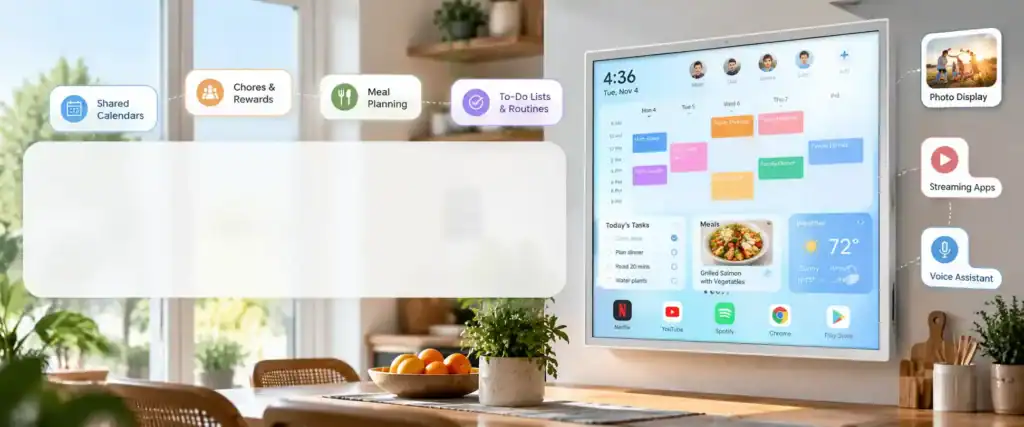
The Cozyla Calendar Plus 2 is a touchscreen digital calendar designed to act as a shared household organizer. Instead of relying entirely on individual phones or paper planners, users can display schedules, tasks and other useful information on a large screen in a common area.
Its main features include:
- Shared calendars and color-coded family schedules
- To-do lists, routines, chores and reward tracking
- Meal planning, recipes and grocery lists
- A customizable dashboard with widgets
- Calendar management through a companion mobile app
- Third-party apps through Google Play
- Voice-assisted features and digital photo display
The result is more than a conventional electronic calendar. It is a large, Android-based display that combines planning with additional applications and entertainment features.
The important question is how much of that functionality you will actually use. A household that needs only a shared schedule may not need such an expensive device, while a family coordinating several people’s routines could benefit from having more information visible in one place.
Cozyla Calendar Plus 2: A Smarter Way to Organize Your Day
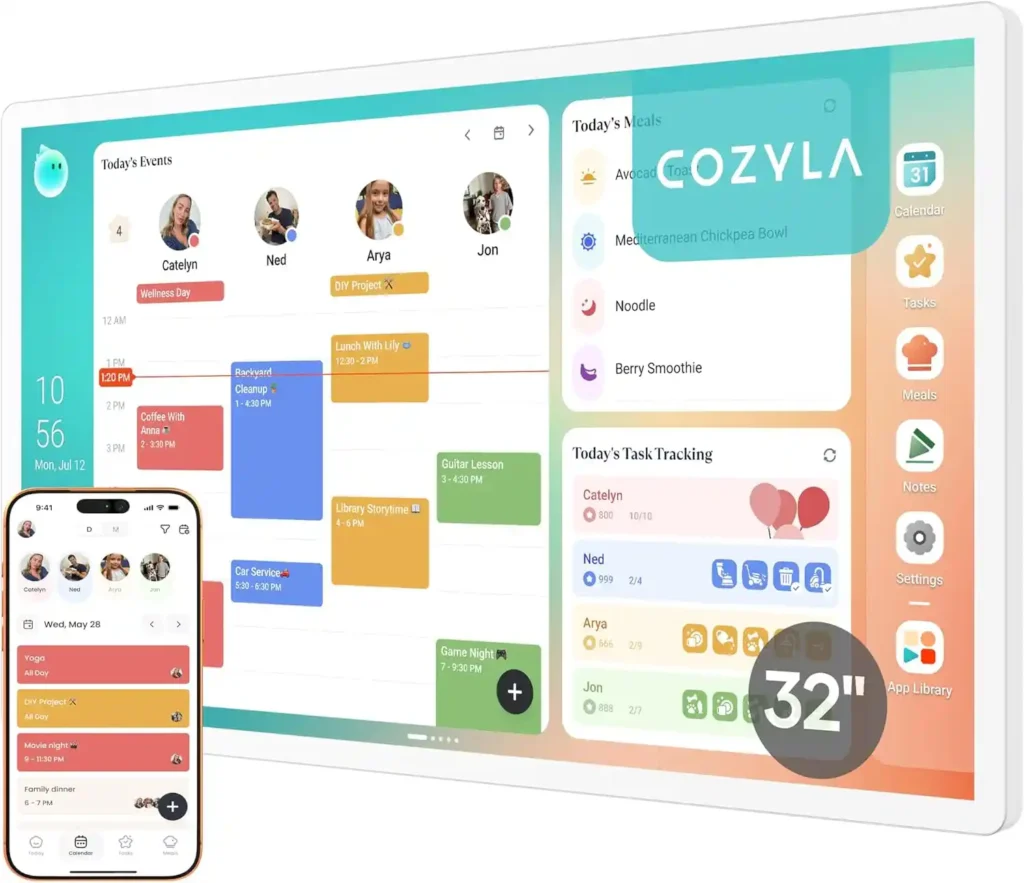
Bring calendars, family schedules, chores, meal plans and to do lists together on one impressive 32 inch touchscreen. With a customizable dashboard, voice assisted features and support for popular calendar services, the Cozyla Calendar Plus 2 helps make everyday plans easier to see and manage. Is this premium digital organizer worth the investment? Take a closer look at its features and decide if it fits your home or home office.
One Shared Calendar. Everyone on the Same Page.
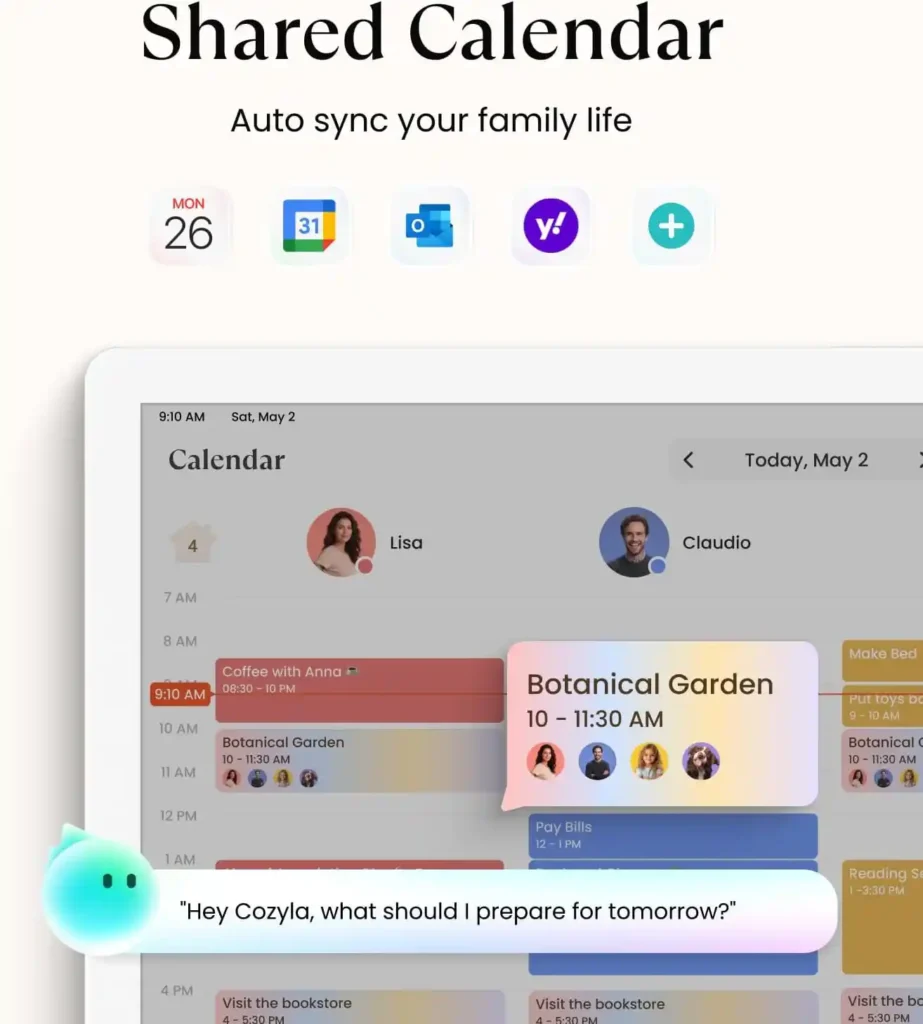
Keep family schedules organized in one place with automatic calendar syncing across popular services. See appointments, coordinate plans, and use voice assisted features to make daily scheduling easier with the Cozyla Calendar Plus 2.
Cozyla Calendar Plus 2 Specifications and Sizes
The product family is available in different screen sizes and resolutions. The exact configuration matters because the price, display sharpness and physical installation requirements can vary.
| Specification | 32-inch 1080p model |
|---|---|
| Product | Cozyla Calendar Plus 2 |
| Screen size | 32 inches |
| Resolution | 1920 × 1080 pixels |
| Display orientation | Portrait or landscape |
| Mounting | Wall-mounted |
| Calendar services | Supported third-party calendars, including Google, Apple and Outlook |
| Operating system experience | Android-based, with supported third-party apps |
| Warranty | Listed by Cozyla as one year; confirm terms for your location |
| Price reference | $899.99 in the supplied Amazon listing |
Always check the exact model page before buying. A 32-inch 1080p display and a 32-inch 4K display are different configurations, even when they share the same product name.
Is the 32-inch screen worth choosing?
A larger display can make a shared schedule easier to view from across a kitchen or common room. It also gives widgets, meal plans and task lists more room on the screen.
However, screen size is not automatically a reason to spend more. Consider the viewing distance, available wall space, power outlet location and whether several people will use the display at the same time.
If the device will sit on a small desk or serve one person, a smaller model or a standard tablet may be more practical.
Features That Could Make Everyday Organization Easier
1. Shared calendar syncing
The Calendar Plus 2 supports compatible calendar services, including Google Calendar, Apple Calendar and Outlook. Events can be displayed together, with color coding helping users distinguish between different people’s schedules.
This is one of the most useful ideas behind a shared digital calendar. Instead of repeatedly asking who has an appointment, when an activity starts or whether a particular time is available, household members can consult a common display.
But calendar syncing deserves special attention before purchase.
In its January 2026 review, T3 reported that some invited events did not appear automatically during testing and that opening the companion app triggered a successful sync. The reviewer found this concerning because reliable calendar visibility is the product’s central purpose.
That report does not establish that every device or user will experience the same issue. It does mean buyers should check current software updates, compatibility and recent user feedback rather than assuming syncing will always be flawless.
For appointments where a missed event would cause a serious problem, keep the original calendar service available as the authoritative record.
2. Chores, routines and rewards
The built-in task tools allow users to assign routines and chores to individual profiles. Tasks can be scheduled, and the reward system can make completion more visible.
For families with children, this could help turn everyday responsibilities into a shared routine. Instead of repeatedly reminding everyone what needs doing, parents can make tasks visible and track progress.
The system may also help adults coordinate recurring responsibilities such as tidying shared areas, preparing for the next day or completing household errands.
The benefit depends on how the family uses it. A complicated reward system that nobody maintains will not improve organization. Start with a few recurring tasks and expand only if the display becomes part of the household’s routine.
3. Meal planning and grocery lists
The Calendar Plus 2 combines meal planning with recipes and grocery-list features. The manufacturer’s materials describe the ability to organize meals and use recipe information to help prepare shopping lists.
For busy households, this may reduce the need to keep meal ideas in one app, shopping lists in another and the weekly schedule somewhere else.
It can be especially useful when deciding what to prepare on busy evenings. A visible meal plan helps household members know what is planned and which ingredients may be needed.
However, this feature is valuable only if it fits your existing habits. Buyers who already have a dependable meal-planning system may gain less from it than households starting from scratch.
4. Customizable dashboard and third-party apps
The Calendar Plus 2 supports a customizable dashboard and compatible apps available through Google Play. This gives it more flexibility than a display limited to one calendar interface.
Depending on supported apps and configuration, users can tailor the screen around their needs rather than relying on a fixed layout.
That flexibility is attractive, but it also creates a potential trade-off: a device with many available functions can become cluttered if the dashboard is not configured thoughtfully.
For the best everyday experience, prioritize the information people need to see quickly. Calendar events, tasks and meal plans are usually more important than filling the display with optional apps.
5. Voice-assisted features
Cozyla promotes voice-assisted functionality for managing selected tasks and information. The exact features and usage limits can depend on the device, software version and membership tier.
Voice control may be convenient when someone is cooking, carrying items or wants to add information without typing. But it should be treated as a convenience rather than the primary reason to buy the device.
Before purchasing, verify which voice features are included, whether any usage allowance applies and what happens when that allowance is exhausted.
6. Photos, entertainment and additional display uses
Because the Calendar Plus 2 supports compatible third-party apps, it can do more than display a schedule. Depending on the installed apps, it may also serve as a digital photo display or an entertainment screen.
This versatility could help the device remain useful when nobody is checking the calendar.
Nevertheless, it is important to keep expectations realistic. A large wall calendar is not automatically a replacement for a dedicated television, computer monitor or tablet. Assess those secondary features as bonuses, not the core justification for the price.
Does the Cozyla Calendar Plus 2 Require a Subscription?
This is an important buying question because ongoing fees can change the long-term cost of a digital organizer.
Cozyla’s published membership information says Calendar Plus series devices include the Essential feature set without requiring a separate Essential membership. Optional Super membership features may be offered separately.
The manufacturer’s feature and membership details can change, so verify the current terms for the exact Calendar Plus 2 model before purchasing. In particular, check whether advanced voice-assistant usage, premium photo features or other optional services have limits or separate charges.
Do not assume that every Cozyla model has the same subscription arrangements. The Calendar Neo and other models may have different feature inclusions.
A sensible comparison should consider both the upfront device price and any optional ongoing costs you expect to incur.
What Are the Main Drawbacks?
A premium digital calendar should be evaluated as carefully as any other connected device. Its attractive features do not remove the practical questions buyers should ask.
The price is substantial
At around $899.99 for the 32-inch 1080p configuration in the supplied listing, this is not a casual purchase for most households.
The value depends on whether the device becomes a regularly used planning hub. If everyone continues to rely on their phones and ignores the wall display, the investment may deliver little benefit.
Before buying, compare the cost with a smaller digital calendar, a tablet mounted on a wall or a free shared calendar displayed on a device you already own.
Calendar reliability matters
T3’s hands-on review reported a calendar-sync issue during testing. That is worth considering because a shared calendar is only useful when its displayed information is dependable.
Look for recent owner feedback about missed events, software updates and the companion app. Check whether the services your household uses are supported and whether the required calendars can be displayed in the way you expect.
Wall mounting needs planning
The 32-inch model is a large display, so decide where it will be installed before ordering. Consider the wall surface, mounting instructions, visibility and proximity to an electrical outlet.
If drilling is not possible, investigate a compatible freestanding solution rather than assuming a wall-mounted product will suit every home.
More features can mean more setup
Calendar connections, profiles, widgets and applications give the device flexibility, but the initial setup takes effort. Someone needs to configure the calendars, choose the dashboard layout and help other users understand how to interact with it.
That is not necessarily a flaw. It is a reminder that the device is most useful when its setup reflects real household needs.
Cozyla Calendar Plus 2 vs. a Standard Tablet
A standard tablet can already display calendars, to-do lists, recipes and many other applications. So why pay for a dedicated digital wall calendar?
The main difference is the intended experience.
| Consideration | Cozyla Calendar Plus 2 | Standard tablet |
|---|---|---|
| Shared visibility | Large, dedicated common display | Depends on screen size and placement |
| Calendar presentation | Designed around a shared planning dashboard | Depends on selected apps |
| Household profiles and chores | Integrated features advertised by Cozyla | May require separate apps |
| Meal planning | Integrated planning tools | Usually requires selected apps |
| Flexibility | Customizable dashboard and supported apps | Broad app flexibility |
| Installation | Requires planned placement and power | Easier to move between locations |
| Upfront cost | Premium for the 32-inch model | Varies widely by device |
| Best fit | A shared planning hub | Individual use or a more flexible budget |
The standard tablet is the more flexible starting point for buyers who already own suitable hardware or want to experiment with digital planning before spending hundreds of dollars.
The Cozyla makes more sense when a large, visible, shared display is itself a priority.
Can You Use the Cozyla Calendar Plus 2 in a Home Office or Small Business?
Although Cozyla primarily markets the Calendar Plus 2 for family organization, some of its features could be relevant to home offices and small workplaces.
A shared display might help make schedules, recurring tasks and basic team information more visible. In a home office, it could also bring personal commitments and work-related appointments into one planning area.
Potential uses include:
- Displaying a shared schedule in a small team workspace
- Showing recurring tasks or routine checklists
- Keeping a common view of appointments and deadlines
- Displaying selected planning information in a home office
However, these are potential uses, not proof that the product is suitable for every business environment.
Before using it at work, verify calendar permissions, account separation, access controls, data privacy requirements and compatibility with the company’s existing systems. A family organizer should not automatically be treated as a business-grade meeting-room scheduling or workplace-management system.
For a small office, the key question is simple: will the display make important information easier to see and use, or will it create another system that employees must maintain?
Is the Cozyla Calendar Plus 2 Worth $900?
The answer depends on how much value your household places on a large shared planning display.
It may be worth considering if:
- Several people coordinate busy schedules.
- You want appointments, chores and meal planning visible in one place.
- A large wall display would be used daily.
- You value the flexibility of a customizable dashboard and compatible apps.
- You are comfortable with the upfront price and the setup required.
You may prefer a cheaper alternative if:
- You mainly need a basic shared calendar.
- Everyone already manages schedules effectively on their phones.
- You do not need meal planning, chore tracking or a large touchscreen.
- You want a device that is easy to move around.
- You are unwilling to troubleshoot occasional software or syncing issues.
For buyers who are unsure, start by listing the three tasks the device must improve. If a shared calendar, family routines and meal planning are all regular problems, the feature combination may justify a closer look. If you only need one of those functions, a simpler product could be better value.
Frequently Asked Questions
What is the Cozyla Calendar Plus 2?
The Cozyla Calendar Plus 2 is a touchscreen digital calendar and organizer that combines shared schedules with features such as chores, routines, meal planning, grocery lists and a customizable dashboard.
Is the Cozyla Calendar Plus 2 worth the price?
It may be worth the price for households that regularly use its shared display and integrated planning tools. Buyers who need only a basic calendar should compare cheaper digital calendars, tablets and free calendar apps before spending around $900.
Does the Cozyla Calendar Plus 2 need a subscription?
Cozyla states that Calendar Plus series devices include its Essential feature set without requiring a separate Essential membership. Optional premium services may still have separate terms or usage limits, so check the current model-specific membership details.
Does Cozyla Calendar Plus 2 sync with Google Calendar and Outlook?
Cozyla lists support for Google Calendar, Outlook and other compatible calendar services. Buyers should verify the exact account and sharing requirements and review recent reports about syncing reliability before relying on the display for important appointments.
What is the difference between the 1080p and 4K models?
Both configurations provide a large digital calendar display, but 4K offers a higher screen resolution. Compare the current prices and specifications for the exact size and configuration before deciding whether the higher-resolution version is worth the additional cost.
Can the Cozyla Calendar Plus 2 be used in an office?
It may be useful for displaying shared schedules and routine tasks in some small offices or home workspaces. However, business buyers should first verify account permissions, privacy, compatibility and whether the device supports their intended workflow.
Can the Cozyla Calendar Plus 2 replace a tablet or television?
It supports compatible third-party apps, which broadens its uses beyond calendar management. However, whether it can replace another device depends on the applications, performance, display quality and audio requirements of the intended use.
Final Verdict: Who Should Buy the Cozyla Calendar Plus 2?
The Cozyla Calendar Plus 2 is best understood as a shared digital planning hub rather than simply an electronic wall calendar.
Its combination of calendar syncing, task management, meal planning and customizable applications could be valuable to busy households that want everyday information visible in one common place. The large display may also appeal to home-office users who want a shared view of schedules and tasks.
The price, installation requirements and reported syncing concerns deserve careful consideration. The device makes the most sense when its core functions will be used consistently, rather than when the attraction is simply having a large touchscreen on the wall.
Before buying, compare the exact screen configuration, check current subscription terms and read recent owner feedback about reliability.
The bottom line: buy it for the shared planning experience you expect to use every day, not just for the number of features on the specification sheet.
Affiliate disclosure: My Appliances Hub may earn a commission from qualifying purchases made through links in this article, at no additional cost to the buyer. Product prices, availability and features may change; confirm current details with the retailer and manufacturer before purchasing.Cozyla Calendar+ 2 Review: The Best Digital Calendar for 2026?